Tutorials · Lesson 4 of 9
Lanes
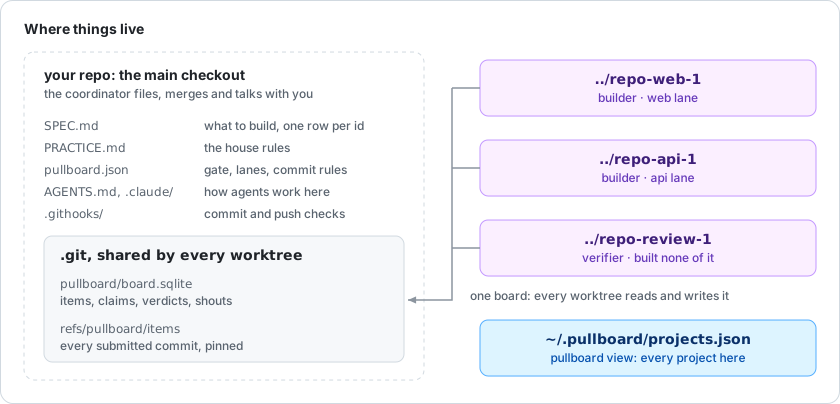
A lane is a part of your system, like web or api, and the folders it owns. Agents work inside lanes, each in its own worktree. A commit outside its proper lane is refused, so lanes never collide and merge conflicts stay rare.
By a lane, we mean:
- Ownership by path: each lane lists its folders in pullboard.json.
- A worktree per agent: its own checkout and branch.
- Refusals at commit: files outside the lane are blocked.
- A pause when you need it: hold stops new claims and says why.
Owned paths
A lane owns paths and spec sections, set in pullboard.json.
{
  "gate": "npm test",
  "lanes": {
    "web": { "owns": ["apps/web/"], "specs": ["G"] },
    "review": { "owns": [] }
  }
}
Refused at commit
A commit outside its lane never lands.
$ git commit -m "feat(web): pay by card [G1]"
pullboard pre-commit: blocked
  - outside the web lane: test/checkout.test.js (coordinator's); shout its owner instead
Fix what each line names. Never work around a refusal with filler text.
Try it
Add an agent to a lane, then pause the lane.
$ pullboard worktree web                    # a worktree and a name in the web lane
$ pullboard lanes                           # every lane and what it owns
$ pullboard hold web --reason "API first"   # next claims nothing there until --off